

Pre-release: the AdsEra app for Zoom is in review for the Zoom App Marketplace. Until it is listed, connect Zoom from inside AdsEra as described below. This page will stay at this address after the app is published.
- Addy on WhatsApp offers your customers free times, books the one they pick as a Zoom meeting and sends them the join link in the chat.
- Ask AI (the assistant inside AdsEra) can list your Zoom connections, look up a meeting, and, if you allow it, schedule, move or cancel meetings.
Adding the app
Before you begin
1
An AdsEra account
You need an AdsEra account at app.adsera.in with access to Marketplace (the Automation permission). Account owners and admins have it by default.
2
A Zoom account
Any Zoom account that can schedule meetings. Meetings are created in the account you sign in with, under that user’s Zoom plan and its limits (for example, the meeting length limit on free Zoom accounts).
3
A free connection on your plan
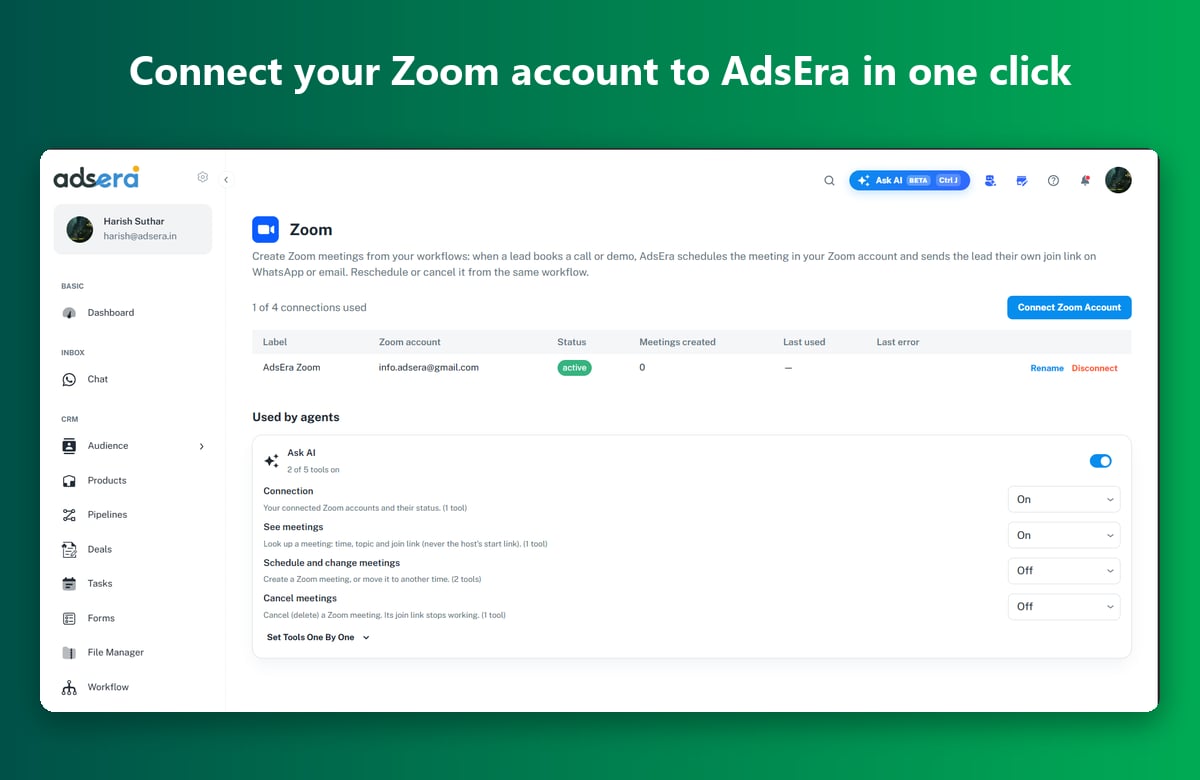
Your AdsEra plan sets how many Zoom accounts you can connect. The Zoom page shows how many you have used, for example “1 of 4 connections used”.
Connect from AdsEra
- Log in to AdsEra and open Marketplace → Zoom (or go straight to app.adsera.in/dashboard/marketplace/zoom).
- Click Connect Zoom Account.
- Zoom opens its sign-in page. Sign in with the Zoom account you want AdsEra to use.
- Zoom shows what AdsEra is asking for. Review it and click Allow.
- Zoom sends you back to AdsEra and you see “Zoom connected”. Your Zoom account appears in the list with the status active.
Install from the Zoom App Marketplace
Once the app is listed, you can also start from Zoom:- In the Zoom App Marketplace, find AdsEra and click Add, then Allow.
- Zoom sends you to AdsEra. Log in if asked.
- AdsEra shows “You added AdsEra from the Zoom Marketplace. Connect your Zoom account to this AdsEra account?”. Click Connect.
- Zoom confirms the account and sends you back with “Zoom connected”.
What AdsEra can access
Your Zoom login tokens are encrypted (AES-256-GCM) and are never shown in the app or sent to AI models.
Using the app
Let Addy book Zoom meetings in WhatsApp
1
Set your booking hours
On Marketplace → Zoom, click Booking for Addy next to the Zoom account. Set:
- Hours: tick the days and set From and To, or tick Use Addy’s business hours.
- Timezone (empty uses Addy’s timezone).
- Meeting length, Gap between meetings and Minimum notice, in minutes.
- Book up to (days ahead) and Max meetings a day (0 means no limit).
- Meeting topic:
{business}and{name}are filled in for each meeting.
2
Turn on Zoom booking for Addy
Open Addy → Goals → Book appointments. Switch on Offer bookings, choose Book in the chat (Zoom) and pick the Zoom account. Save Addy.
3
Customers book in the chat
When a customer asks for a call or demo, Addy offers free times inside your booking hours. When the customer picks one, Addy creates the Zoom meeting and sends the join link in the chat. Addy only needs the customer’s name.Addy never offers a time that is already taken by another Zoom, Cal.com or Calendly booking. A customer can ask Addy later for the time and join link of the meetings they booked.
Use Zoom with Ask AI
Ask AI is the assistant button at the top of every AdsEra page. With Zoom connected, you can ask things like:- “Which Zoom accounts are connected?”
- “What’s the join link for meeting 8123 4567 890?”
- “Schedule a 30-minute Zoom call with Priya tomorrow at 4 pm.”
- “Move that meeting to Friday 11 am” or “Cancel it.”
Turn on the last two only if you want Ask AI to change meetings. Ask AI confirms with you before it cancels a meeting.
Troubleshooting
"Zoom could not be connected" after signing in
"Zoom could not be connected" after signing in
Click Connect Zoom Account and try again: the sign-in link is valid for 10 minutes, so a page left open too long fails. If you clicked Cancel or Deny on Zoom’s page, start again and click Allow. If your Zoom account is managed by a company, your Zoom admin may need to approve the app first.
"Your plan allows N Zoom connections"
"Your plan allows N Zoom connections"
You have used every Zoom connection on your plan. Disconnect an account you no longer use, or upgrade your AdsEra plan.
The status shows "error"
The status shows "error"
Zoom stopped accepting AdsEra’s login, for example after a Zoom password change or the app being removed in Zoom. The Last error column shows Zoom’s message. Click Reconnect and sign in again.
Addy doesn't offer any times
Addy doesn't offer any times
Check Booking for Addy: at least one day must be ticked, Book up to (days ahead) must be more than 0, and Max meetings a day may already be reached. A long Minimum notice can also push every slot of the day out. Also check that Book in the chat (Zoom) is chosen on Addy’s Goals tab with the right Zoom account.
A meeting can't be scheduled for a time that has passed
A meeting can't be scheduled for a time that has passed
AdsEra refuses start times in the past. Pick a later time, and check the timezone shown under your Zoom account.
Ask AI says it can't schedule or cancel meetings
Ask AI says it can't schedule or cancel meetings
Those tools are off by default. Turn on Schedule and change meetings or Cancel meetings under Used by agents on the Zoom page.
Removing the app
You can disconnect from AdsEra or remove the app from Zoom. Either way does the same thing.Disconnect in AdsEra
- Open Marketplace → Zoom.
- Click Disconnect next to the Zoom account.
- Confirm. You see “Disconnected and deleted”.
Remove the app from Zoom
- Sign in to the Zoom App Marketplace.
- Click Manage → Added Apps (or search for AdsEra).
- Click Remove next to AdsEra and confirm.
What happens when you remove it
- AdsEra revokes its Zoom login and deletes the connection straight away: the login tokens and your Zoom user ID, account ID, email, name and timezone. AdsEra makes no further calls to Zoom for that account.
- Addy stops booking Zoom meetings with that account. Pick another booking option on Addy’s Goals tab, or connect Zoom again.
- Ask AI loses its Zoom tools for that account.
- Meetings already created stay in your Zoom account, and their join links keep working. Cancel them in Zoom if you no longer want them.
- AdsEra keeps the record of meetings it booked (time, topic, join link and the customer’s name and phone) so your chat history still makes sense. To have all your Zoom-related data deleted, email [email protected]. We complete deletion within 1 day.
Privacy and support
- Privacy: adsera.in/privacy
- Support and data requests: [email protected]
- Security issues: [email protected]