> ## Documentation Index
> Fetch the complete documentation index at: https://docs.adsera.in/llms.txt
> Use this file to discover all available pages before exploring further.
# Email Campaign List
> Your central hub for managing all email campaigns, from drafts to sent, and monitoring their performance at a glance.
**Want to Manage Email Campaigns? [Go to the AdsEra Email Campaign Page →](https://app.adsera.in/dashboard/campaign/mail/list)**
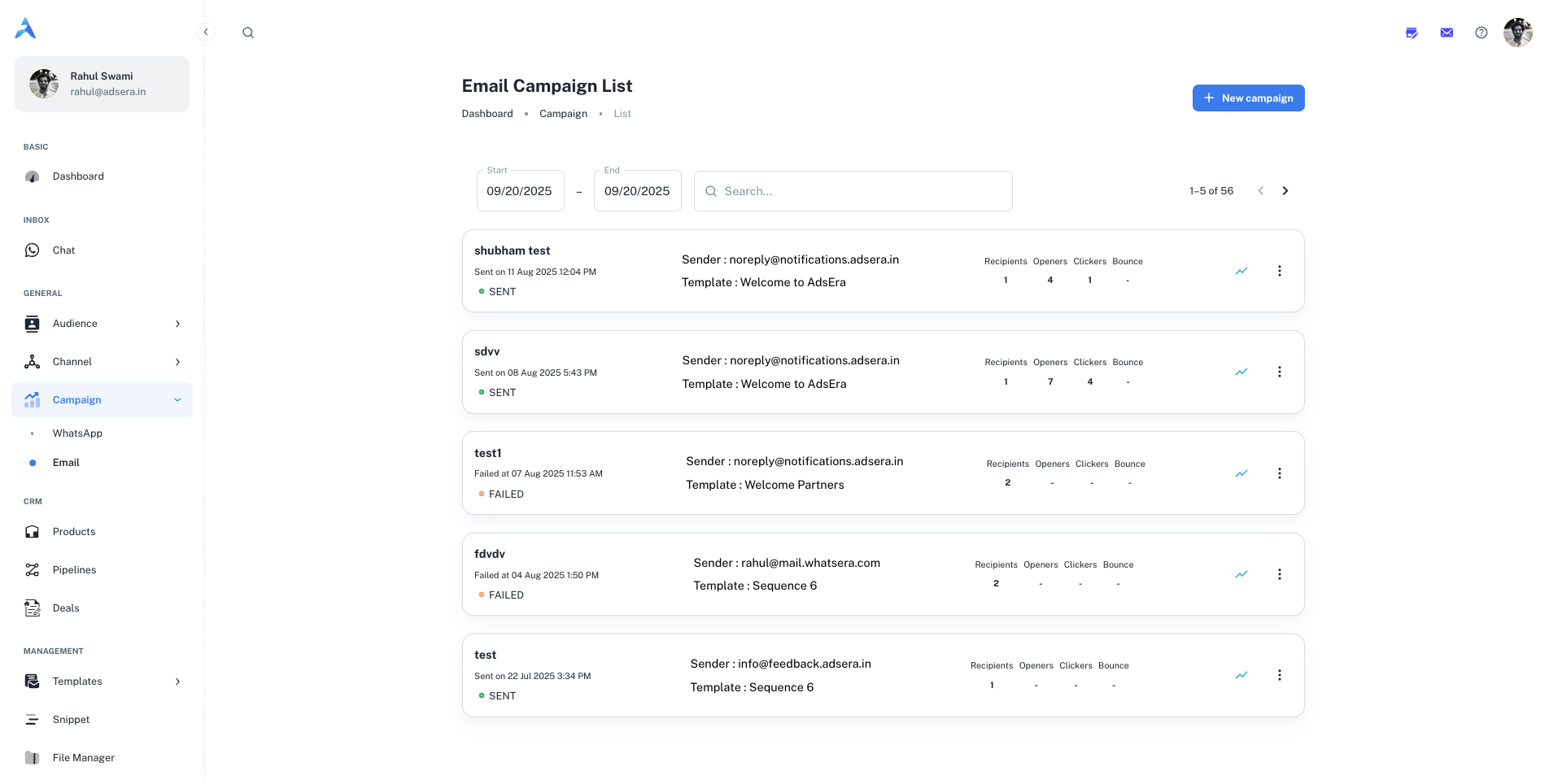
The Campaign List is your central hub for managing all your email campaigns, whether they're drafted, sent, or have encountered issues. From here, you can monitor performance, create new campaigns, and manage existing ones with ease.
**Dedicated IP Required:** You can only send email campaigns from a dedicated IP address. AdsEra does not permit sending campaigns without one to protect deliverability for all users. To acquire a dedicated IP, please [Contact Us](https://adsera.in/contact-us).
### Navigating to Your Campaigns
Accessing your Campaign List is simple:
From your AdsEra Dashboard, click on **Campaigns** then **Email** in the left-hand navigation bar.
This will take you directly to your Campaign List page, displaying all your campaigns as individual cards.
***
## Anatomy of a Campaign Card
Each card on your Campaign List represents an individual email campaign and provides key information at a glance. Here's a detailed breakdown of what you'll see:
| Section | Field / Metric | Description |
| :---------- | :------------------------- | :------------------------------------------------------------------------------------------------------------------------------------------------------------------------------------------------------------------------- |
| **Header** | **Campaign Name** | The internal name you assigned to your campaign for easy identification. |
| | **Sent On / Last Updated** | The date and time the campaign was sent. For drafts, this shows the last update time. |
| | **Status Tag** | A color-coded tag indicating the campaign's current status:
- `DRAFT`: Created but not yet sent.
- `SENT`: Successfully sent to your recipients.
- `FAILED`: Encountered an error and could not be sent. |
| **Details** | **Sender** | The email address from which the campaign was sent (e.g., `info@adsera.in`). |
| | **Template** | The name of the email template used for the campaign. |
| **Metrics** | **Recipients** | The total number of unique contacts the campaign was intended for. |
| | **Openers** | The number of unique recipients who opened your email. |
| | **Clickers** | The number of unique recipients who clicked at least one link. |
| | **Failure** | The number of emails that failed to deliver (e.g., bounced). |
***
## Searching and Filtering Your Campaigns
To help you find specific campaigns quickly, you can filter your list by a date range at the top of the page.
1. Click on the **Start** date field to open a calendar and select a beginning date.
2. Click on the **End** date field to open a calendar and select an end date.
This will instantly update the list to show only campaigns sent within that specific period, which is especially helpful for quarterly or monthly performance reviews.
***
## Actions: Managing Your Campaigns
Each campaign card offers direct actions to help you manage your campaigns effectively.
To start building a brand new email campaign, click the **"+ New campaign"** button located at the top left of the page. This will take you to the campaign creation wizard.
For a full walkthrough, see our guide on [Creating an Email Campaign](/help/campaign/email/create).
For any sent campaign, click the **"View complete campaign analysis"** button to go to a detailed report. Here you can find in-depth statistics like click-through rates, unsubscribe rates, and geographical data.
Learn more in our guide to [Analyzing Campaign Reports](/help/campaign/email/report).
On the top right of each campaign card, the **three-dots (...) menu** reveals a dropdown with several powerful actions:
* **Start:** For Draft campaigns, this allows you to initiate the sending or scheduling process.
* **Copy:** Creates an exact duplicate of the campaign, including its content and settings. This is perfect for reusing successful campaign structures.
* **Report:** A shortcut that takes you directly to the detailed analytics report for that campaign.
* **Edit:** Allows you to make changes to the campaign's content, subject line, or recipients. This is only available for campaigns in `DRAFT` status.
* **Delete:** Permanently removes the campaign from your list.
This action cannot be undone. All data associated with the campaign will be lost.